
In part 1, we discussed how Silverlight applications talk to their site of origin server. In this post, we’ll dive into the high level concepts around Silverlight’s cross domain HTTP communication. Then next time, we’ll go into details of how to set up a cross domain policy file.
Note: this tutorial has been updated for Silverlight 2 RTW.
(Series Links: Part 1, Part 2, Part 3)
What is Cross Domain Communication?
As mentioned last time, your Silverlight application by default can only talk back to its site of origin server. This is in line with the general browser sandbox, and is designed to prevent cross site forgery.
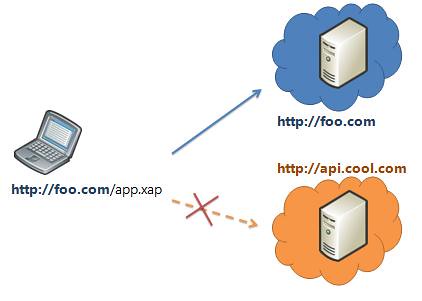
The site of origin server is determined by the app’s deployment URI: the location of the XAP for managed applications, the address of the XAML page for javascript applications.
If a HTTP request matches the origin server’s domain, protocol, and port number, then it’s considered a site of origin request and is allowed. Otherwise, it’s classified as a cross domain call.
Silverlight’s Cross Domain Policy Support
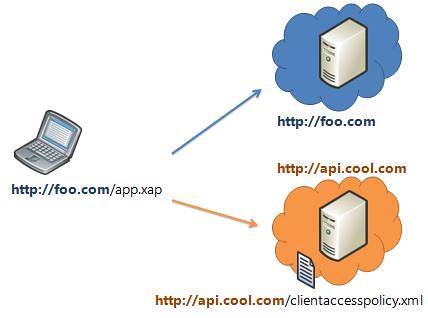
In order for a cross domain request to a particular web service to succeed, that web service needs to explicitly opt-in to 3rd party callers.
In Silverlight 2, the primary way of enabling cross domain calls is through a policy file placed at the root of the server. We support two types of policy files:
- Silverlight Cross Domain Policy File (clientaccesspolicy.xml)
- (A subset of the) Flash Cross Domain Policy File (crossdomain.xml)
What Can You Say to a Cross Domain Server?
Basic Capabilities
So, you’ve got permission from the appropriate policy file to make a cross domain request . What can you do with that request?
- Scheme: HTTP and HTTPS (file:// and other protocols are not supported)
- Verb support: GET & POST
- Status codes: 200 (OK) or 404 (NotFound) only
Request Headers
By default, only Content-Type request headers are allowed to be sent. A policy file can explicitly opt in to setting certain headers. There is also a set of blacklist headers that can never be sent.
Request headers can only be sent on POSTs, not GETs.
Cookies & Authentication
All the requests you send will have have cookies and authentication sent with them. This is a significant point, and we’ll dig into it deeper in the part 3 of this post series.
The above capabilities are determined by the browser plugin’s networking APIs. Please see Part 1 for a deeper discussion of networking stack implementation.
Path Character Restrictions
Silverlight has placed certain restrictions on the path portion of a cross domain URI.
 Specifically, a cross domain request path CANNOT contain:
- “..” (consecutive dots)
- “./” (dot and a forward slash)
- “%” (percent sign, thus preventing %-encoding)
This restriction was done to prevent attacks around path manipulation and %-encoded path manipulation, which malicious apps could use to try to escape out of an allowed path into a disallowed path.
Where does Silverlight Look for the Cross Domain Policy File?
When a request is detected as a cross domain request, we look first for a Silverlight policy file at the root of the request’s server.
| Request URI | Policy File Checked |
| http://foo.com/bar/data | http://foo.com/clientaccesspolicy.xml |
| http://sub.foo.com/bar/data | http://sub.foo.com/clientaccesspolicy.xml |
| http://foo.com:8080/bar/data | http://foo.com:8080/clientaccesspolicy.xml |
If such a clientaccesspolicy.xml file does not exist or is malformed, we then look for a crossdomain.xml file at the same location.
“Caching” Of Policy Files
Silverlight looks up the cross domain policy file for a particular server ONCE per application session. (Where an application session is the lifetime of a particular xap or xaml page instance in memory.)
Also, we use the browser networking stack to issue the request for the policy file, so the normal browser caching of the request happens under the covers.
Redirects
Redirects for the policy file itself are not allowed.
Request URIs redirects will only be successful if the original and final URIs are allowed via the appropriate cross domain policy. (Note: The browser handles handles the actual redirect logic itself and ensures it matches w3 spec.)
So that’s the high level cross domain behavior overview. Next time, we’ll drill into how to set up a cross domain policy file.
Do I understand correctly that the “.” (as in /over/there.xml) is illegal in a cross-domain URI?
Good clarification. Single dots are allowed (just not consecutive dots.) I clarified above.
That’s what I thought and denying consecutive dots is definitely good practice. Thanks for the clarification. URLs that do not have “file extensions” are cool anyway [grin].
Hmm, just curious is it in the future possible to load the policy-file from a different location? I’m thinking about using Google Picasa Web API.
http://code.google.com/apis/picasaweb/reference.html#Flash
They have a crossdomain.xml on a different location: http://photos.googleapis.com/data/crossdomain.xml
The best will be a clientaccesspolicy.xml file to be added by Google. But any ideas? There are a lot of Web APIs available but few maybe none have that clientaccesspolicy.xml file on the root.
My ISP is blocking port 80 so my website is using 8080. I just have my silverlight apps hosted there to show friends and family. Everything works great until i try to use my web service with silverlight.
As soon as i try to call any WebMethods async call externally it crashes. Everything works internally… Here is what i think is the problem. When i type [my ip]:8080 internally the domain is read as “localhost” externally its read as [my ip].
Externally this is a problem because i cannot host anything through just [my ip] it has to be through [my ip]:8080…
I am not sure this is what is happening, but i cannot figure it out.
Any ideas (other than getting on port 80)?
Can a path segment of a cross domain request contain parenthesis?
e.g.
http://myhost/base/accounts(A1094)?orderby=Name
I didn’t see the underscore or dash characters included, and they would need to be included in the allowed set.
Thanks,
Jeff
I created web service using Rest.It works fine in a single machine.but access from different machine XMLHttpRequest.open(“GET”,”https://192.168.1.2/”,”true”) leave a exception “Access to restricted URI denied” security error.How to overcome it.please give the solution.
Thanks a lot for the review.
Do you plan to change the restriction on the cross domain Uri?
Now it seems to be no sense in making remote calls to Sharepoint lists content with Silverlight as it often has at least some spaces in folder names.
Hi all
I am facing a cross domain communication problem..
My Service is in “http://praveen/website/Service.asmx”
clientaccesspolicy.xml file path is “http://praveen/website/clientaccesspolicy.xml”
My silverlight application running in “http://localhost/TestSilverLightApplication.Web/TestSilverLightApplicationTestPage.aspx”
I am getting a cross domain access problem…
any one help me
thanks
Thanks a lot. It really helped me.
Pingback:Cross-Domain requests in Silverlight and using Yahoo Pipes as a proxy | Coffee Cup