
This is going to be a three parter. 🙂 Today, we’ll dig into the core networking capabilities of the HTTP stack for site of origin communication. In the next two parts, we’ll go deep into understanding our HTTP cross domain support.
Note: this tutorial has been updated for Silverlight 2 RTW.
(Series Links: Part 1, Part 2, Part 3)
So, You Want To Phone Home…
In Silverlight 2, by default, you are only able to talk back to your site of origin server. This is in line with the general browser sandbox, and is designed to prevent cross site forgery.
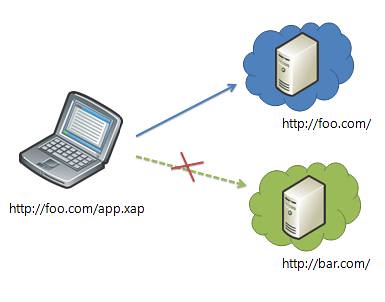
To determine if a HTTP request is going back to site of origin, we look at the deployment URI of the XAP and the request URI. Comparing these two URIs, 3 things must match:
- Same domain. http://foo.com is different than http://bar.foo.com or http://www.foo.com
- Same protocol. http://foo.com is different than https://foo.com
- Same port. http://foo.com is different than http://foo.com:8080
If all three things match, the request will be allowed to go out into the world. If they don’t, by default, we’ll disallow the request and throw an exception. (Cross domain policies will be covered in part 2 of this post series.)
What Can You Say to Your Site of Origin Server?
You can talk to your site of origin server with the below capabilities:
- Verb support: GET & POST
- Request header support: Most standard & custom headers
- Status codes: 200 (OK) or 404 (NotFound) only
Also, all the requests you send will have the “right thing happen” to them from a cookies and authentication standpoint. This is a result of us leveraging the hosting browser to make the HTTP request.
HTTP requests themselves are:
- Asynchronous only
Why Those Capabilities?
The above capabilities are the result of:
- Requirements for basic web services
- Restrictions in the underlying browser plug-in networking APIs
To implement our Silverlight HTTP stack, we use the browser plug-in’s networking APIs. The HTTP capabilities we expose are therefore bound by the common set of capabilities exposed by the browsers that Silverlight supports.
Note: There are other ways we could have implemented the networking stack. For instance, we could have proxied all calls through the browser’s XmlHttpRequest object. However, this would have imposed a site of origin restriction on the requests, and we wanted to enable cross domain communication to existing web services. Similarly, we could have gone directly to the operating system’s networking APIs, but then we would have lost the cookies and authentication integration with the browser. In the future, exploring multiple of these stacks to expose more capabilities is definitely a possibility, and is something we would like feedback on.
What APIs Should I Use?
There are two APIs in Silverlight for HTTP communication. The first is WebClient and the second is HttpWebRequest.
WebClient
WebClient is a great API with a simple, events-based paradigm. You can use it to easily download or upload a strings and Streams.
For a download, WebClient does a GET request and then gives you back the result in the form you wanted. For an upload, WebClient does a POST and sends the data you passed it. It also automatically resolves relative URIs against the deployment URI of the XAP.
Sample: Downloading a string using WebClient
1: private void DownloadString()
2: {
3: WebClient webClient = new WebClient();
4:
5: // Hook up events
6: webClient.DownloadProgressChanged += new DownloadProgressChangedEventHandler(webClient_DownloadProgressChanged);
   7:     webClient.DownloadStringC
ompleted += new DownloadStringCompletedEventHandler(webClient_DownloadStringCompleted);
8:
9: // Initiate download
10: webClient.DownloadStringAsync(new Uri("myfeed.xml", UriKind.Relative));
11: }
12:
13: void webClient_DownloadProgressChanged(object sender, DownloadProgressChangedEventArgs e)
14: {
15: // Update progress UI
16: progressTextBox.Text = e.ProgressPercentage;
17: }
18:
19: void webClient_DownloadStringCompleted(object sender, DownloadStringCompletedEventArgs e)
20: {
21: if (e.Error == null)
22: {
23: // Clear progress UI and show downloaded string
24: progressTextBox.Text = "";
25: feedTextBox.Text = e.Result;
26: }
27: }
28:
HttpWebRequest & HttpWebResponse
HttpWebRequest and HttpWebResponse are the standard .NET HTTP apis. They are much more powerful than WebClient but also more complex to use.
Sample: Sending POST request using HttpWebRequest
1: SynchronizationContext syncContext;
2:
3: private void Page_Loaded(object sender, EventArgs e)
4: {
5: // Grab SynchronizationContext while on UI Thread
6: syncContext = SynchronizationContext.Current;
7:
8: // Create request
9: HttpWebRequest request = WebRequest.Create("http://msite.com/myFeed") as HttpWebRequest;
10: request.Method = "POST";
11: request.Headers["x-custom-header"] = "value";
12:
13: // Make async call for request stream. Callback will be called on a background thread.
14: IAsyncResult asyncResult =
15: request.BeginGetRequestStream(new AsyncCallback(RequestStreamCallback), request);
16: }
17:
18: private void RequestStreamCallback(IAsyncResult ar)
19: {
20: HttpWebRequest request = ar.AsyncState as HttpWebRequest;
21: Request.ContentType = "text/xml";
22: Stream requestStream = request.EndGetRequestStream(ar);
23: StreamWriter streamWriter = new StreamWriter(requestStream);
24: streamWriter.Encoding = Encoding.UTF8;
25: streamWriter.Write("<?xml version="1.0"?>"
26: + "<entry xmlns="http://www.w3.org/2005/Atom">"
27: + "<author>"
28: + "<name>Elizabeth Bennet</name>"
29: + "<email>liz@gmail.com</email>"
30: + "</author>"
31: + "<title type="text">Entry 1</title>"
32: + "<content type="text">This is my entry</content>"
33: + "</entry>");
34:
35: streamWriter.Close();
36:
37: // Make async call for response. Callback will be called on a background thread.
38: request.BeginGetResponse(new AsyncCallback(ResponseCallback), request);
39: }
40: private void ResponseCallback(IAsyncResult ar)
41: {
42: HttpWebRequest request = ar.AsyncState as HttpWebRequest;
43: WebResponse response = request.EndGetResponse(ar);
44:
45: // Invoke onto UI thread
46: syncContext.Post(ExtractResponse, response);
47:
48: // use response. Could include reading response stream.
49: }
50:
51: private void ExtractResponse(object state)
52: {
53: HttpWebResponse response = state as HttpWebResponse;
54: // use response. Could include reading response stream.
55: }
Feedback – We Love It
Do the capabilities of our HTTP stack satisfy your needs? What do you think of the API set? We’d love to hear your thoughts.
Stay Tuned for Cross Domain Support in Part 2….
Why only GET & POST?
According to REST principles, there should be at least PUT & DELETE methods…
Great article (as usual) in what I hope will be a long series to come 🙂
I played with the WebClient (http://www.galasoft.ch/mydotnet/articles/article-2008032301.html) and it works well. I welcome that you replaced the Downloader with that object. The Downloader felt a little like a hack. Good move there.
I also think that supporting the whole set of verbs (also HEAD) would be a good move. What is the reason to leave them out?
Looking forward to the next post about cross-domain.
Greetings,
Laurent
I really feel that the ability to do synchronous communication is essential.
The code base of large applications get way too complicated when using asynchronous communication. Just look at your (very small) post example above. With synchronous communications, it would have been a one-liner. In large applications with hundreds (if not thousands) of web service calls that has to be called in specific sequences, this is not maintainable.
The burden it places on the programmer with regards to state handling is simply too great for many applications.
And of course, it should be posible to do synchronous communications in background threads to avoid blocking the UI.
At the very least, I think you should implement a standard way of calling out through the XmlHttpRequest object. As it stands, everybody has to create their own wrappers for this. I know that the XmlHttpRequest is limited in what it will do, but for many (most?) applications it will be enough.
Also, you need to support all the HTTP verbs, return the exact status codes from the server, and allow for access to all ports on the server (if the server allows it).
Thanks!
I second the missing PUT and DELETE verbs problem. WTF?!
Also, why restrict the supported status code either – double WTF?!
I see Silverlight as finally enabling the creation of an awesome RESTful client – why cripple it?
I hope there is still time to fix these before 2.0 RTMs.
OK, so I understand you have browser APIs to contend with…
In which case PLEASE can we have some way to switch back to using XmlHttpRequeset under the covers? I need PUT and DELETE. I need access to a full HTTP spec implementation.
Sure, for cross-site access limit me to GET/POST, if that’s what you need to do. But please do not limit the 80% use case (for me) which is talking to my own server!
I can’t think of anything worse than having to stick with JavaScript, just for XHR!!
First, thank you everyone who has both read and commented so far!
As Andrew pointed out, the verb, status code and other HTTP capability limitations bound by the fact that the browser plugin networking APIs do not support things beyond what we’ve exposed. We wanted to use the browser stack (in order to get browser-enabled caching, auth, cookies, etc). And we also wanted to enable cross domain support, which meant not using XmlHttpRequest. This left us the browser plugin networking stack.
We are definitely evaluating what we can do here in the short term and long term, and your feedback is especially helpful in this area.
Also note that you are, if you really need to, able to access the XmlHttpRequest object via the HTML Bridge feature in managed code. After I finish this series, I’ll try to publish a full sample on how to do this.
As to supporting asynchronous only requests, this is also a result of browser limitations. The browser plugin networking API only exposes async requests on the UI thread. Enabling a Silverlight synchronous request would result in a deadlock: we would block on the synchronous request and then never get the asynchronous callback from the browser. Moreover, though, the idea of a blocking call on the UI thread (which would affect the entire browser UI) seems like something we don’t want to encourage as a platform. We are looking at expanding what you can do with the WebClient class so as to make certain types of calls easier and reduce the scenarios that someone would need to use the HttpWebRequest class directly.
Anyways, thanks again for the read and the comments – keep them coming!
Thanks,
Karen
>>Why only GET & POST?
My reply From this link http://silverlight.net/forums/p/11035/35632.aspx#35632
(Note: I really like to discuss this issue. If I don’t get the notification from this post, please find me in my blog..)
I think it’s possible to do PUT or DELETE in Silverlight.
I think you are talking about HttpWebRequest.
AFAIK, there are two options to use other Http Verbs in Silverlight.
1. You can simply use HttpWebRequest.
For example:
HttpWebRequest request = (HttpWebRequest)WebRequest.Create(serviceURL);
request.ContentType = “application/json”;
request.Method = “DELETE”;
request.BeginGetRequestStream(new AsyncCallback(ReadCallback), request);
Note: Honestly, I’m not so sure whether I have tested it or not. I think it will work. but the important thing is that you should use IIS for web service instead of VS development server. If I remember correctly, there are some problems in response code.
Or
2. You can use XmlHttpRequestWrapper.
I wrote about that in my post.http://michaelsync.net/2008/03/16/adonet-data-service-astoria-in-silverlight-2-beta1
I used Http “DELETE” for deleting the data from Astoria.
I haven’t implemented for updating yet since there was some problems at this point.
There are unbelievable interesting in Astoria.
1) we have to use application/json for inserting new record and deleting the existing record
2) we have to use application/xml for updating one property of object at a time
3) we have to use “application/atom xml” for updating the whole properties of object at a time.
but supporting “DELETE” or “PUT” is not that important since there might be some firewalls that don’t allow those requests..
From Astoria point of view, we are able to use “POST” instead of “PUT”.
For example:
The POST request with this URL http://localhost:52976/SL2Astoria_Web/WebDataService.svc/Products(16) is for updating.
The POST request with this URL http://localhost:52976/SL2Astoria_Web/WebDataService.svc/Products is for inserting.
Limited HTTP verbs and minimal HTTP Status codes makes Silverlight a non-starter for anyone building scalable rich clients that support intermediaries like caching proxies.
As a call out, there are existing ways that web services choose to deal with limitations with limited HTTP verbs and status codes… Examples include:
– Tunneling verbs through post (“POST Tunneling”).
Many firewalls today only allow GET and POST verbs through.
Some web services look at the X-HTTP-Method-Override header
on posts. If X-HTTP-Method-Override is “DELETE”, the server
treats that request like a DELETE.
– Returning errors in the response stream.
Since returning status codes is a limitation for any plugin
using the browser’s networking APIs, some web services choose
to always return OK and then serialize an error message in
the response stream.
We definitely understand that these limitations are less than ideal, but hopefully after reading this post, you have a better understanding of why certain tradeoffs were made in the SL2 timeframe.
I’ve been playing around with HttpWebRequest and doing POST operations with doubly async gets tricky. Relatively easy for single files, but if you want to capture information on POST status and sizes there’s nothing that provides this (unlike the full .NET stack which does based on feeding the stream). The workarounds for this are horrendous (Wilco’s Upload component is a good example of the complexity involved). While a specialty scenario I too feel that HTTP operation – even if it’s a more complex scenario – should be easier because it’s the lifeblood of a thin client application. One of the key scenarios will be to send data back and forth and status information is a key scenario for this IMHO.
There’s socket support now, so why couldn’t there be a native HTTP stack that bypassed XHR and all the limitations that implies completely? Wouldn’t it be much easier to spin up a new thread and on that thread synchronously deal with the post operation where you could capture progress events? From a programming model that’s much easier. Alternately if there was someway to implement the API in such a way that progress events can fire as the upload is in progress that too would help greatly…
Karen,
The GET / POST methods are okay, since we can use the x-http-method-override pattern.
I am concerned about the limited support for HTTP response codes. How would we handle a 401 to implement security?
A real world example of something I am working on is to consume RESTful services in a SilverLight client via a server, which is secured using digest authentication. It would seem awkward to navigate to the web server and be prompted with the browser’s default credentials dialog prior to even downloading the SilverLight application. How would we do this in a cross-domain scenario?
I also noticed that the WebClient class does not even have a Credentials (ICredentials) property like the full framework.
Cheers,
Stuart
Interesting, and i see why you when this route.
What I would like to see is example of searching and downloading YouTube videos. I believe these API are created to build RIA sites that consume you own content, but not the content from other sites, or at least friendly sites.
I wish someone would just say “YouTube and Google Content are just off limits to silverlight, no mater what type of cross domain support we provide”
IS THIS TRUE? if not can you provide a simple example?
Hi,
With ref to synch calls, i appreciate that asynch are largely preferable and we would be using them if we could but we are building a mapping site which calls to a GIS application for content. This application solely supports synchronous calls and so we are now in a position of looking for another GIS engine or using another web delivery mechanism…
Andy
WebClient’s DownloadString & DownloadData methods are unfortunately very limited:
WebClient ignores HTTP headers concerning the encoding of the response. This means that UTF-8 response will incorrectly be decoded using whatever is the default system code-page (and thus break extended characters very easily in an internationalization-dependent fashion). This is most unfortunate; HTTP supports the specification of a character set via the MIME type (or an explicit header) – is there a chance this will be fixed?
Concretely, unless a developer is extremely careful, using WebClient will result in a broken program depending on where the silverlight app is run, and even if the developer is extremely careful, it’s not possible to perform a robust http request using WebClient; instead, a rather complex series of fallbacks must be implemented using HttpRequest. Even without encoding auto-detection, such an implementation is needlessly error-prone and difficult to test, and as such would be a prime candidate for inclusion in WebClient (which seems to be intended to be simple, after all).
Thanks for this post. I built a File Upload tool in Silverlight 2 beta 1, and just recently ported it to beta 2. Your article was very useful to me when I reworked the client/server communications, I use WebRequest together with a helper class I built to invoke PageMethods in ASP.NET pages. The changes from beta 1 to beta 2 (requests now running in their own thread etc) gave me headaches, but thanks to your post I could solve the problems!
Karen –
In your post, you show the use of custom headers and in the reply. You also seem to point to them as a work around for other limitations (X-HTTP-Method-Override). However, when I actually try to use a custom header in Silverlight, it bombs. Remove the custom header and all is good (except of course you can’t do what you are trying to accomplish). Is this something that is supposed to work or was it intentionally left out?
Thanks,
~Jeff
Pingback:Hot Find #1, Dec 2008 - Anytao.net
Pingback:Newly Noted #4 | Patrick Verbruggen's Blog
Dear Karen,
The fact that Silverlight has limited features is no problem for me – I understand that with a smaller runtime you get less features, and I am grateful for the Silverlight alternative to WPF. A workaround is easy enough once you know where the problem is.
Which brings me to my point. I wasted a lot of time trying to figure out why I was only getting FileNotFound responses to my web requests. Stupidly, I referred to the online help:
http://msdn.microsoft.com/en-us/library/system.net.httpwebresponse.statuscode(VS.95).aspx
and it didn’t tell me of the limitations so I just kept plugging away.
So please keep your help files up to date and don’t forget to include the bad news.
Pingback:Recent Links: ASP.NET, ASP.NET AJAX, ASP.NET MVC, Silverlight « Tad Wang’s Weblog
Pingback:Silverlight 2 Changes | karen corby's fabulous blog
Pingback:Silverlight HTTP Networking Stack – Part 3 (Configuring a Cross Domain Policy File) | karen corby's fabulous blog